
Admin Software That Gets Invoices Out Faster and Keeps the Office Running Clean
ShopView gives heavy-duty shop admin staff a faster way to generate accurate invoices, track payments, manage customer records, handle fleet billing, and keep the back office organised - without rebuilding job information from scratch at the end of every day.
Saved daily on invoicing, data entry, and paperwork
Average time to generate an invoice from a completed work order
Invoice accuracy when labor and parts are tracked through ShopView
Trusted by Admin Teams at Heavy-Duty Repair Shops Across North America
Office managers, billing coordinators, service advisors, and admin staff at diesel, truck, fleet, and heavy equipment repair shops use ShopView to get invoices out faster, keep customer records clean, and stop spending half the day chasing job information that should already be in the system.




Stop Rebuilding Every Invoice from Scratch
In most heavy-duty shops without a connected system, invoicing is not just billing - it is archaeology. Admin staff spend the end of every day tracking down job notes, chasing technicians for time cards, calling the parts room to find out what was used, and piecing together a work order that should have been documented as the job happened.
ShopView connects every piece of job information - labor hours, parts used, technician notes, customer approvals, shop supplies - to the work order in real time, as the repair happens. When a job is complete, the invoice is ready to generate in under a minute. No reconstruction. No missing charges. No delayed payments because the paperwork was not done.
The Tools Admin Staff Need to Keep the Office Running
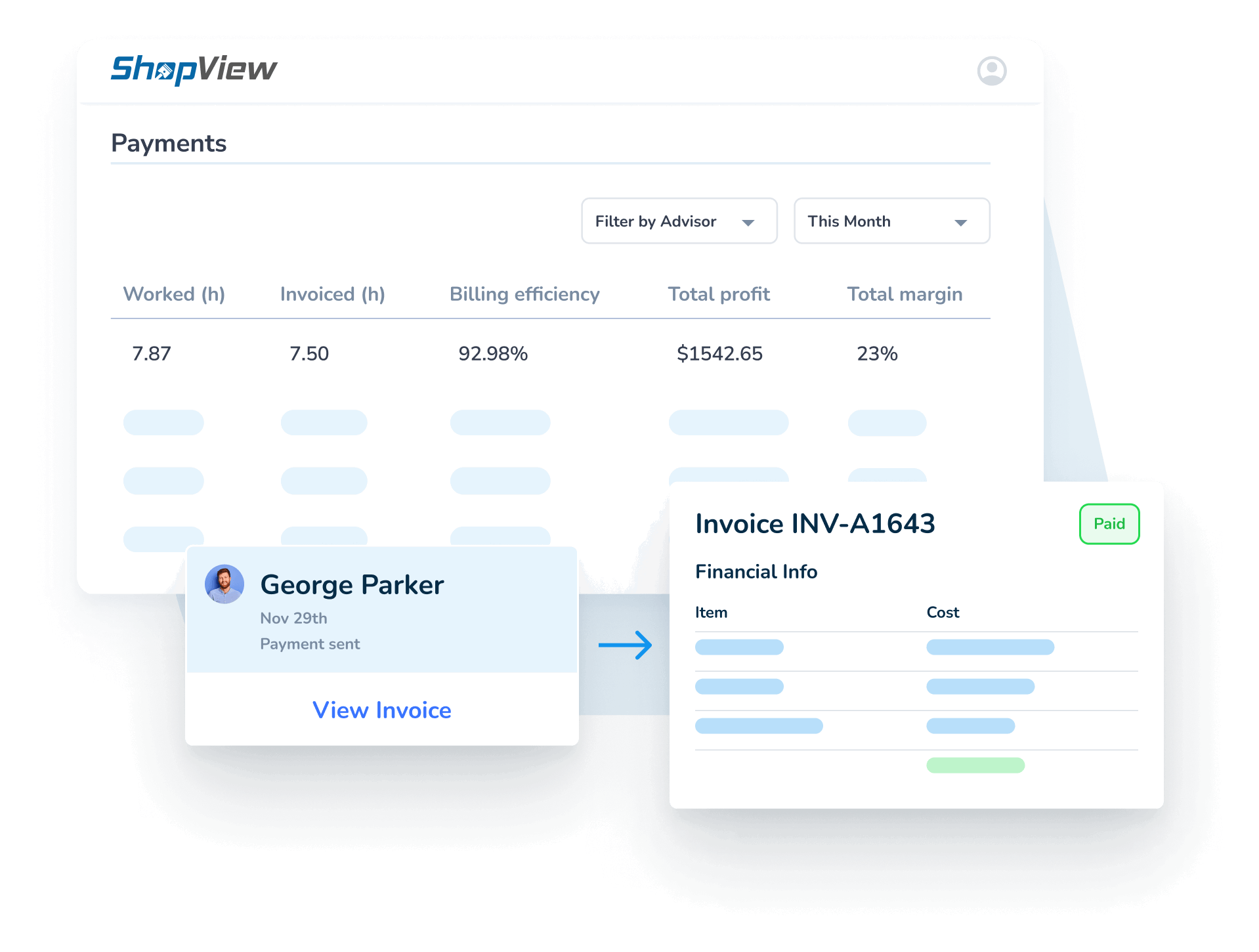
Generate Accurate Invoices in Under a Minute
When a job closes in ShopView, everything needed to bill is already attached: labor hours from the time clock, parts from the work order, technician notes, shop supplies, taxes, and approved work. Admin staff generate the invoice directly from the repair order with one click - no manual data entry, no tracking down missing information, no starting from a blank form. For shops processing 15 to 40 invoices a day, eliminating the rebuild step at closeout saves hours of admin time every shift and significantly reduces the risk of missed charges.
- One-click invoice generation from completed work orders
- All labor, parts, shop supplies, taxes, and fees already attached
- Professional invoice format with full job detail for customers
- Approval history and customer sign-off visible on every invoice
- Send invoices digitally or print - whichever the customer prefers
Manage Fleet Billing and Repeat Customers Without Extra Admin
Fleet customers are your most important accounts - and the most demanding to bill correctly. They expect accurate invoices that match what was approved, clear service history for each unit, and billing that reflects the terms of their account. When fleet billing is done manually, mistakes happen and relationships suffer. ShopView gives admin staff fast access to every fleet customer's records, open work orders, service history by unit, and billing status - from one screen. Repeat fleet vehicles are recognised automatically, prior service pulls up instantly, and invoices are generated with the same accuracy whether the customer has one truck or fifty.
- Full fleet customer and unit history accessible in seconds
- Batch invoicing for fleet accounts with multiple units in the shop
- Customer portal gives fleet clients visibility into job status and invoices
- Consistent billing across all units in a fleet account
- Payment tracking by customer, fleet account, and invoice date
Keep Customer Records Clean and QuickBooks in Sync
Admin staff in a heavy-duty shop are responsible for more than invoicing. Customer records, payment history, account notes, fleet unit information, and financial data all have to stay accurate - across the shop system and the accounting software. ShopView connects with QuickBooks Online so invoices, payments, and customer records sync automatically without double entry. What goes into ShopView flows into QuickBooks. Admin staff do not have to maintain two sets of records or reconcile discrepancies at month end.
- QuickBooks Online integration - invoices and payments sync automatically
- Customer records include full contact info, unit history, and billing notes
- Payment tracking shows what is paid, what is outstanding, and what is overdue
- Reduce duplicate data entry across shop system and accounting software
- ShopView Payments built-in payment processing - accept payments anywhere
What Admin and Office Teams Are Saying
"ShopView is the first centralized software we have implemented across five states and seven facilities. They have taken feedback and turned it into opportunities for growth and greater success. ShopView is full of great people who are deeply customer focused."
Heather A.
Senior Staff Accountant, Farming

"ShopView is the most user friendly platform I have utilized in a very long time. Their onboarding team was in touch throughout the entire process and provided one on one training. This platform is going to streamline countless processes and increase our productivity tenfold."
Kylie M.
Office Manager, Construction
"The software is easy to set up. It is also intuitive, making it easy to train technicians. Customer support is by far the best I have ever dealt with. Fast replies and they go above and beyond to help you solve your problem."
Brian W.
Fleet Coordinator

What Admin Teams See with ShopView
Saved daily on invoicing, data entry, and paperwork
To generate an invoice from a completed work order
Missed charges when parts and labor are tracked through ShopView
7 facilities managed through one ShopView account (Heather A., Senior Staff Accountant)
From Job Completion to Invoice in Under a Minute
The Job Closes With Everything Already Documented
When a technician completes a job in ShopView, labor hours are already logged, parts are already attached, notes are already recorded, and any customer approvals are already in the system. Admin staff do not chase anything - it is all there.
Generate the Invoice Directly from the Work Order
Open the completed work order, review the line items, and generate the invoice with one click. Labor, parts, shop supplies, taxes, and fees are all pre-populated. Edit anything that needs adjusting and send - digitally or in print.
Track Payment and Sync to QuickBooks Automatically
Mark the invoice as paid when payment comes in. ShopView tracks payment status across all open invoices and syncs automatically with QuickBooks Online - no re-entry, no reconciliation, no end-of-month surprises.
Admin Accuracy Starts With What Happens in the Shop
The cleanest invoices come from the cleanest job documentation. When technicians log their time, parts managers track usage, and service managers keep work orders updated, admin staff get everything they need to bill accurately - without chasing anyone.
Shop Owner
Revenue, profitability, and performance data.
Learn moreService Manager
Job tracking, scheduling, and work order management.
Learn moreTechnician
Labor logging, job notes, and repair documentation.
Learn moreParts Manager
Parts tracking, inventory, and job-level parts billing.
Learn moreBuilt by People Who Have Run the Back Office of a Heavy-Duty Shop
ShopView was built by people who know what it means to manage the administrative side of a heavy-duty repair operation - the invoicing pressure at end of month, the fleet customer who wants a detailed breakdown of every unit, the QuickBooks reconciliation that takes longer than it should, and the feeling of finally getting paid on a job that was completed two weeks ago.
Every admin feature in ShopView exists because someone in a real shop needed it to work exactly that way.
Why Heavy-Duty Shop Admin Teams Choose ShopView
QuickBooks Online Integration
ShopView connects with QuickBooks Online so invoices, payments, and customer records sync automatically. Admin staff manage the shop in ShopView and the books stay current in QuickBooks - without double entry or manual exports.
ShopView Payments Built-In
Accept payments anywhere with ShopView Payments, the built-in payment processing. Customers can pay by card in person, online through the customer portal, or by link. Payments are recorded and synced automatically.
Customer Portal
Give fleet customers and repeat clients self-service access to job status, estimates, and invoices through ShopView's customer portal. Fewer phone calls, fewer status update requests, and faster approvals - all without adding admin work.
The Complete Guide to Admin Software for Heavy-Duty Repair Shops
The admin function in a heavy-duty repair shop is the connective tissue between the work happening in the bays and the revenue landing in the bank account. When it works smoothly, invoices go out fast, payments come in on time, customers are informed, and the books stay accurate. When it does not work, everything backs up - and the shop owner usually does not find out until the end of the month.
Admin software built for heavy-duty repair is not generic billing software with a shop-specific skin. It is a platform that understands how repair jobs are documented, how fleet customers are billed, how QuickBooks connects to shop operations, and how to get an invoice out in under a minute without losing accuracy.
What Is Repair Shop Admin Software?
Repair shop admin software is a shop management platform that gives administrative and billing staff the tools to generate invoices, track payments, manage customer records, handle fleet accounts, and keep financial data accurate and current - connected to the same system the technicians, parts team, and service managers use.
For heavy-duty repair shops, this means:
- Invoicing that pulls directly from completed work orders without rebuilding
- Fleet billing that handles multiple units, account terms, and service history
- Payment tracking across all open invoices and customer accounts
- QuickBooks integration that keeps accounting current without double entry
- Customer records that include unit history, billing notes, and account status
- Reporting on invoice activity, outstanding balances, and cash flow
- Digital payment acceptance through built-in payment processing
How Fleet Maintenance Management Software Changes Admin Operations
Fleet maintenance management is one of the most admin-intensive workflows in heavy-duty repair. Fleet customers bring in multiple units, expect consistent service history, require detailed invoicing that matches approved work orders, and often operate on account terms that need to be tracked separately from walk-in customers.
Without a connected system, managing fleet accounts means maintaining separate records for each unit, reconciling invoices against work orders manually, and spending significant time on billing that should be largely automated. ShopView's fleet management capabilities give admin staff fast access to every fleet customer's records, open jobs, unit service history, and billing status - from one screen, updated in real time.
For shops that do significant fleet maintenance volume, this is not a minor improvement. It is the difference between fleet accounts being a profitable and manageable part of the business and fleet accounts being a source of constant billing errors and strained relationships.
The Real Cost of Slow Invoicing in a Heavy-Duty Shop
Every day an invoice sits before it goes out is a day that payment is delayed. In a heavy-duty shop processing 20 to 40 jobs a week, invoice delays compound quickly. A shop that takes an average of three days from job completion to invoice delivery is carrying weeks of completed but unbilled work at any given time.
The cash flow impact is significant. The risk of errors grows with every day that passes between job completion and billing - details get forgotten, notes get misplaced, and the longer admin staff wait, the more time they spend reconstructing what happened on a job that should already be documented.
ShopView compresses the time from job completion to invoice delivery to under a minute. Because all job information is captured in real time as the repair happens, there is nothing to reconstruct. Admin staff generate the invoice, review it, and send it. The whole process takes less time than it used to take to find the paper work order.
Truck Shop DMS Versus Shop Management Software
Dealer management systems (DMS) and shop management platforms serve different operational purposes, and the distinction matters for admin staff. A truck shop DMS is typically built around dealership operations - vehicle sales, OEM warranty claims, manufacturer integrations, and franchise-specific workflows. A shop management platform like ShopView is built around the repair and service side of heavy-duty operations - work orders, technician labor, parts tracking, invoicing, and fleet billing.
For independent heavy-duty repair shops and fleet maintenance operations, a shop management platform designed for repair workflows will give admin staff faster invoicing, better job-to-billing connectivity, and more practical fleet account management than a DMS adapted from a dealership context.
The key capabilities admin staff should look for in any heavy-duty shop management platform:
- Direct invoice generation from completed repair orders
- Fleet account management with unit history and batch billing
- QuickBooks Online integration for automatic financial sync
- Built-in payment processing without a separate merchant account
- Customer portal for fleet clients to view status and approve estimates
- Outstanding payment tracking and aging reports
- Customer record management with full service and billing history
How QuickBooks Integration Saves Admin Hours Every Week
The most time-consuming admin task in most heavy-duty shops that use QuickBooks is the manual sync between the shop system and the accounting software. Invoices entered in the shop system have to be re-entered in QuickBooks. Payments recorded in QuickBooks have to be checked against the shop system. Customer records maintained in one place have to be updated in the other.
ShopView's QuickBooks Online integration eliminates this entirely. Invoices created in ShopView sync to QuickBooks automatically. Payments recorded in ShopView update QuickBooks in real time. Customer records are maintained in one place and reflected in both systems. Admin staff spend that time on work that actually requires human judgment - not data re-entry.
Managing Multi-Location Admin Operations with ShopView
For shops with multiple locations, admin complexity multiplies. Invoicing, payment tracking, customer records, and financial reporting all have to stay consistent across facilities - which is nearly impossible when each location is running its own spreadsheets or disconnected systems.
ShopView supports multi-location admin operations from one platform. A senior staff accountant or operations admin can see invoice status, payment tracking, and customer records across all facilities without switching systems or requesting reports from each location separately. This is exactly the workflow that ShopView customers managing five or more facilities rely on.
Choosing Admin Software as a Shop Office Manager
If you are the office manager or billing lead evaluating software for your shop, these are the questions that matter most:
- Can I generate an invoice from a completed work order without rebuilding it?
- Does it handle fleet accounts with multiple units and different billing terms?
- Does it connect to QuickBooks Online without manual exports or re-entry?
- Can I track outstanding payments and aging invoices from one view?
- Does it support digital payments and a customer portal?
- Can it scale to multiple locations without a separate system for each?
- Will support help me configure billing workflows to match how our shop operates?
ShopView answers yes to all of these. It is built for the admin reality of a heavy-duty repair operation - not adapted from a retail billing tool or a general service management platform.
Frequently Asked Questions
Ready to Get Invoices Out Faster and Stop Rebuilding Jobs at the End of Every Day?
Join heavy-duty repair shops using ShopView to generate accurate invoices in under a minute, manage fleet accounts without extra admin work, and keep the back office running clean - connected to the same system the whole shop uses.